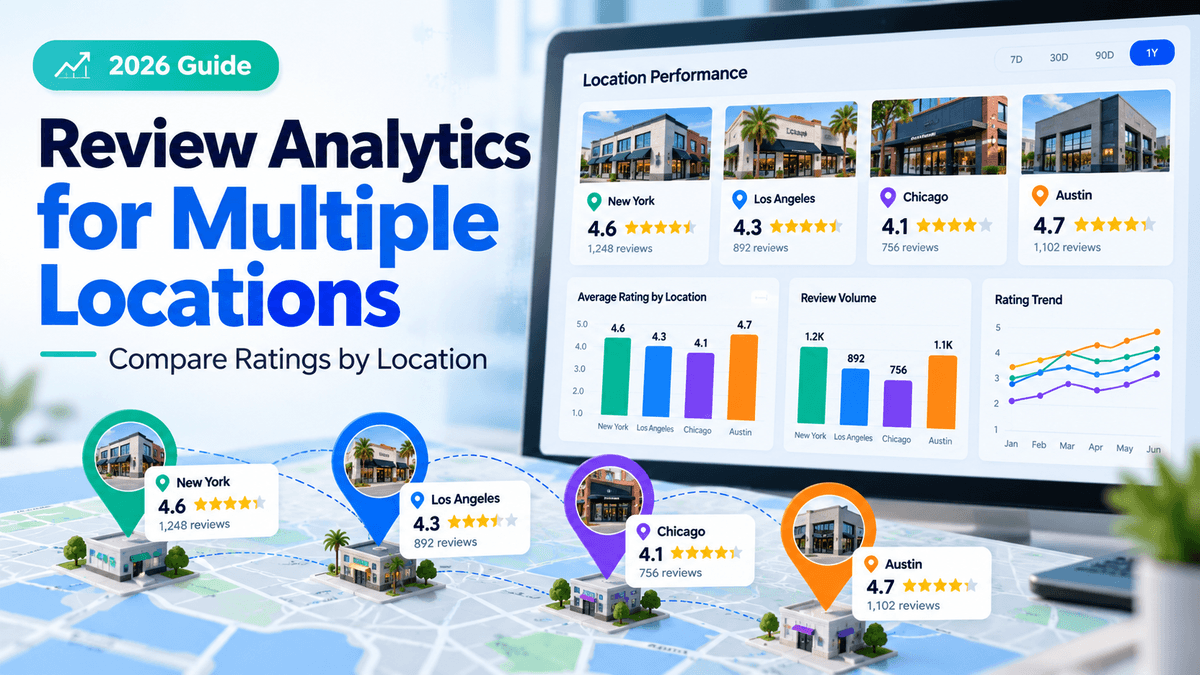
Review analytics for multiple locations helps businesses compare customer ratings, review volume, sentiment, and response performance across branches. The most effective approach combines recent rating trends, review counts, rating distribution, and recurring feedback themes rather than relying on average star ratings alone.
By comparing locations over consistent periods and investigating meaningful differences, businesses can identify underperforming branches, improve customer experiences, and measure whether corrective actions work.
This guide explains which metrics to track, how to calculate and compare ratings, how to build a useful dashboard, and what to look for in multi-location review analytics software.
What Is Review Analytics for Multiple Locations?
Review analytics for multiple locations is the process of collecting, measuring, and comparing customer reviews across two or more business locations.
Instead of looking only at a company's overall reputation, location-based analysis examines how individual stores, restaurants, healthcare practices, dealerships, or franchise branches perform.
For example, a restaurant chain might have a network-wide average rating of 4.3 stars, while individual branches range from 3.6 to 4.8 stars.
The overall average provides a useful summary, but it may conceal customer experience problems at particular branches.
Multi-location review analytics helps businesses answer three questions:
- Which metrics matter? Average rating, review count, rating distribution, recency, sentiment, response rate, and response time.
- How should locations be compared? Using consistent time periods, comparable review sources, adequate sample sizes, and appropriate peer groups.
- Which locations need attention? Those showing sustained rating declines, repeated complaints, increasing negative feedback, or unresolved reviews.
The objective is not simply to rank branches by star rating. It is to understand why customer experiences differ and identify improvements that local managers can implement.
Which Review Metrics Matter Most Across Multiple Locations?
An effective review analytics dashboard combines customer satisfaction indicators with review activity and management performance.
Average ratings are useful, but they do not tell the whole story.
A branch may maintain a strong lifetime rating even when recent customers report declining service quality. Similarly, a location with relatively few reviews may have an excellent average that changes significantly after just one or two new ratings.
Essential multi-location review analytics KPIs
| Metric | How to measure it | Why it matters |
|---|---|---|
| Average star rating | Total star points ÷ number of rated reviews | Summarizes customer ratings |
| Review volume | Number of published reviews | Provides context for interpreting ratings |
| Recent average rating | Average rating within a defined reporting period | Shows more recent performance |
| Rating distribution | Percentage of reviews at each star level | Reveals variation hidden by averages |
| Review recency | Date of latest review and new reviews per period | Shows how current the feedback is |
| Review response rate | Responded-to reviews ÷ eligible reviews × 100 | Measures response coverage |
| Response time | Time between publication and business response | Identifies delays in review handling |
| Negative sentiment share | Negative text reviews ÷ classified text reviews × 100 | Measures dissatisfaction in written feedback |
| Complaint frequency | Reviews mentioning a specific problem ÷ relevant text reviews × 100 | Identifies recurring operational issues |
| Review growth | New reviews received during a defined period | Measures changes in review activity |
These metrics should not be interpreted interchangeably.
Ratings, review volume, and sentiment describe different aspects of customer feedback. Response rates and response times measure how businesses manage that feedback.
For sentiment and complaint frequency, businesses must use consistent classification rules. Reviews without written comments should generally be excluded from text-analysis calculations but retained in star-rating calculations.
Review growth also requires context. A location receiving fewer reviews may have lower customer traffic, an ineffective review-request process, or simply fewer customers who choose to post public feedback.
Review volume alone cannot establish which explanation is correct.
Lifetime ratings vs. recent ratings
Lifetime ratings reflect cumulative historical performance. Recent ratings provide a more focused view of current customer feedback.
Consider a branch with an all-time average of 4.6 stars but an average of 3.7 stars during the previous 90 days.
The lifetime rating may remain high because older positive reviews substantially outnumber recent negative ones.
Regional managers should investigate the recent decline rather than assuming the historical rating accurately reflects current service quality.
A practical reporting structure is:
- Lifetime: Overall rating history and cumulative review count.
- Last 90 days: Recent rating trends, review activity, sentiment, and recurring complaints.
- Last 30 days: Emerging problems requiring closer monitoring.
These are suggested analytical windows, not Google requirements.
For locations receiving very few reviews, a rolling 180-day or 12-month window may provide more useful information than a monthly average based on only a handful of ratings.
Even with longer periods, review counts should remain visible so readers can judge the strength of the underlying evidence.
How Do You Calculate Average Star Ratings Across Locations?
A location's average star rating is calculated by dividing the sum of its star ratings by the total number of rated reviews.
Average star rating = Sum of star ratings ÷ Number of rated reviews
For example, if a location receives five ratings of 5, 5, 4, 4, and 3 stars:
Average rating = (5 + 5 + 4 + 4 + 3) ÷ 5 = 4.2 stars
When comparing several locations, businesses must distinguish between two different methods of calculating network performance.
Simple average vs. review-weighted average
Consider a fictional retail chain operating three branches.
| Location | Lifetime reviews | Average rating |
|---|---|---|
| Austin | 10 | 4.8 |
| Dallas | 160 | 4.3 |
| Houston | 290 | 4.1 |
| Total | 460 | — |
Method 1: Simple average of location ratings
Formula:
(4.8 + 4.3 + 4.1) ÷ 3 = 4.40 stars
This approach gives each location equal weight, regardless of how many reviews it receives.
It answers the question: What is the average rating across these three locations when each location counts equally?
Method 2: Review-weighted network average
Formula:
[(4.8 × 10) + (4.3 × 160) + (4.1 × 290)] ÷ 460
= 1,925 ÷ 460
= 4.18 stars, rounded to two decimal places.
This method weights each location according to its number of reviews.
It estimates the average rating across all included reviews rather than treating every branch equally.
Which calculation should businesses use?
Both calculations are useful, but they answer different questions.
Use the simple average when the objective is to summarize the performance of the average location.
Use the review-weighted average when the objective is to summarize ratings across all reviews in the dataset.
For executive reporting, displaying both can prevent misleading conclusions.
However, neither method replaces individual location analysis.
A company could have a strong network average while several branches perform poorly.
Important calculation limitation: The example assumes exact underlying location averages. In real reporting, calculations based on rounded public ratings may differ slightly from calculations using individual review scores.
Whenever possible, calculate network ratings from original review-level data and keep platform-specific results separate.
Google, Yelp, and other review platforms may differ in review availability, collection policies, and moderation practices. Combining their star ratings into one number can obscure those differences.
How Can Businesses Compare Ratings Across Locations Fairly?
Comparing locations fairly requires more than arranging branches from highest to lowest rating.
Review counts, reporting periods, location maturity, customer traffic, service models, and market conditions can influence how differences should be interpreted.
1. Compare equivalent reporting periods
Do not compare one location's recent performance with another branch's lifetime ratings.
Use consistent reporting periods and inclusion rules.
For example, compare Google reviews published between July 1 and September 30, 2026, for every branch.
For trend analysis, compare that period with the previous equivalent period.
Also distinguish review publication dates from dates when reviews were edited or imported. Otherwise, historical reviews may incorrectly appear as new activity.
2. Account for different review counts
A location with 4.9 stars from eight reviews has a much smaller evidence base than one with 4.7 stars from 800 reviews.
The first branch may be delivering excellent customer experiences, but its average is more sensitive to individual ratings.
Businesses should display review counts alongside average ratings and flag low-volume locations for closer examination.
There is no universal review-count threshold that makes every comparison reliable.
An appropriate minimum depends on how frequently a business receives reviews, how much variation exists in ratings, and the decision being made.
Also remember that public reviews are self-selected feedback. A large number of reviews does not necessarily represent every customer served by a location.
3. Group comparable business locations
A small suburban retail outlet may not be directly comparable with a flagship city store.
Similarly, a quick-service restaurant should not automatically be benchmarked against a full-service restaurant offering a different customer experience.
Use peer groups where operating conditions are reasonably similar.
| Comparison factor | Recommended approach |
|---|---|
| Business type | Compare locations providing similar products or services |
| Location maturity | Separate newly opened and established branches |
| Market characteristics | Consider differences between urban, suburban, and rural areas |
| Service model | Separate full-service, limited-service, and other relevant formats |
| Review platform | Compare Google with Google, Yelp with Yelp |
| Review count | Flag locations with limited feedback |
| Reporting period | Apply consistent 30-, 90-, or 180-day windows |
| Operating circumstances | Note closures, renovations, major staffing changes, or service disruptions |
For franchise networks, location ownership and management responsibilities also matter.
Miidasu's guide to franchise listings management and field ownership explains how corporate teams and local operators can divide responsibility for business information.
A similar governance model works for review analytics: headquarters establishes reporting standards, regional managers compare performance, and local teams investigate customer concerns.
4. Use adjusted ratings carefully
Businesses sometimes use adjusted or smoothed ratings to reduce the influence of unusually small review samples.
One possible method is:
Adjusted rating = (n × R + m × C) ÷ (n + m)
Where:
- n = Number of reviews for the location
- R = Location's average rating
- m = Chosen weighting value
- C = Average rating of the comparison group
Suppose a location has 10 reviews averaging 4.8 stars, while its peer-group average is 4.2.
Using a chosen weighting value of 20:
Adjusted rating = [(10 × 4.8) + (20 × 4.2)] ÷ 30
= 132 ÷ 30
= 4.4 stars
The adjusted score moves the low-volume location closer to the peer-group average.
This can help reduce overreaction to small samples.
However, the weighting value is an analytical choice. It does not establish statistical confidence, correct reviewer-selection bias, or represent Google's publicly displayed star rating.
If adjusted scores are used, keep the actual rating, review count, weighting method, and adjusted rating visible.
For most operational dashboards, recent ratings, sample sizes, and customer complaint themes are easier to interpret than a single adjusted score.
How to Track Google Reviews Across Multiple Business Locations
Businesses can track reviews manually through their Google Business Profiles or use authorized integrations to consolidate review data.
Manual reporting may be sufficient for a small number of branches.
For larger networks, centralized collection reduces repetitive work and helps maintain consistent reporting definitions.
Step 1: Create a master location database
Start with a reliable inventory of every business location.
Record:
- Permanent location ID
- Business name and address
- Google Business Profile location identifier
- Region or franchise group
- Operating status
- Assigned location manager
- Relevant review sources
Permanent identifiers are important because business names, addresses, and management assignments may change.
A location database also helps prevent closed branches, duplicate records, or renamed stores from distorting reports.
For more guidance, see Miidasu's multi-location business listings management guide.
Step 2: Collect review data
Google provides review retrieval methods through its Business Profile APIs.
The official Business Profile Reviews API returns a paginated list of reviews for authorized, verified locations.
Its response includes individual reviews, an average rating, total review count, and pagination information.
Google also documents a batch review retrieval method supporting up to 50 verified locations per request, with pagination where necessary.
Appropriate API access, authorization, and profile verification are required.
For each review, collect available fields such as:
- Location identifier
- Review identifier
- Review source
- Star rating
- Written feedback, if present
- Review creation date
- Review update date
- Business reply information
Save historical reporting snapshots so that deleted, edited, or newly added reviews can be distinguished from previous records.
Do not assume that every review platform provides identical data or that every monitoring vendor can retrieve and respond to reviews on every source.
Step 3: Separate reviews from profile engagement metrics
Review analytics and Google Business Profile performance metrics answer different questions.
The Google Business Profile Performance API provides access to supported profile performance data, including daily metrics and monthly search-keyword impression information.
It is separate from the review retrieval API.
A reporting system should distinguish between:
Review metrics: Ratings, review volume, sentiment, and responses.
Profile engagement metrics: Available interactions and other performance measures associated with the business profile.
Keeping these datasets separate makes it easier to investigate possible relationships without incorrectly treating correlation as proof that reviews caused changes in engagement.
Step 4: Calculate location-level KPIs
For each location, calculate the metrics defined in your reporting framework.
At minimum, include:
- Lifetime average rating
- Recent average rating
- Review count for the reporting period
- Share of low-star reviews
- Negative sentiment share among classified written reviews
- Response rate and response time
- Most frequently reported problems
Use clear denominators.
For example, a response rate might include only reviews eligible for a business response on a particular platform.
If one system counts all ratings while another counts only written reviews, their response rates may not be directly comparable.
Similarly, a one-star review and a negative sentiment classification are different measures. A customer can leave a relatively high rating while describing a specific problem in the text.
Step 5: Compare and investigate
Once metrics are standardized, group comparable locations and identify patterns.
Look for branches experiencing:
- Declining recent ratings
- An increasing proportion of negative feedback
- Repeated complaints about the same operational issue
- Unusually low response coverage
- Longer response delays
- Significant differences from comparable branches
Managers should then read the underlying reviews.
A single negative review may describe an isolated incident. Several independent reviews mentioning the same problem over time may justify a deeper operational investigation.
How Do You Identify Underperforming Locations?
An underperforming location is one showing persistent customer experience concerns relative to its own history or reasonably comparable branches.
Star ratings alone are insufficient to make that determination.
Consider the following fictional example.
| Metric | Austin | Dallas | Houston |
|---|---|---|---|
| Lifetime rating | 4.8 | 4.3 | 4.1 |
| Lifetime reviews | 10 | 160 | 290 |
| Last 90-day rating | 4.2 | 4.5 | 3.6 |
| Last 90-day reviews | 5 | 30 | 50 |
| Negative written-review share | 20% | 8% | 32% |
| Review response rate | 60% | 93% | 48% |
Illustrative data only. These figures are not actual business results or findings from independent research.
Which location should managers investigate first?
Houston is the strongest candidate for immediate investigation.
It has the lowest recent rating, the highest negative sentiment share, and the weakest response performance.
Its 50 recent reviews also provide more feedback to examine than Austin's five.
Dallas appears relatively healthy based on the selected metrics.
Austin's recent rating decline deserves monitoring, but its small sample makes strong conclusions premature.
A sensible review process does not automatically label the location with the lowest lifetime rating as the worst performer.
Instead, it evaluates several related indicators and investigates the underlying customer feedback.
Prioritize issues by evidence, severity, and recurrence
Regional managers can use a simple prioritization framework.
| Priority | Review pattern | Recommended action |
|---|---|---|
| Urgent | Credible allegations involving immediate safety, discrimination, privacy, or other serious risks | Escalate promptly to the appropriate responsible team |
| High | Recurring complaints combined with declining recent ratings | Investigate the operational cause and assign corrective action |
| Medium | Poor response coverage or emerging negative sentiment without a clear recurring issue | Audit response workflows and monitor new feedback |
| Monitor | Low review volume or an isolated rating change | Collect more evidence and compare future periods |
This is an example of an internal prioritization framework, not a universal scoring standard.
A serious issue may require attention even when the location's average rating remains high.
Likewise, a location with several negative reviews may not have a systemic problem if the comments concern unrelated, isolated incidents.
The purpose of the framework is to guide investigation, not automatically judge employees or branches.
How to Build a Multi-Location Review Analytics Dashboard
A useful dashboard should provide a network-wide overview while allowing managers to investigate individual branches.
Executives need concise performance summaries. Regional managers need location comparisons. Customer experience teams need complaint themes, and local operators need actionable review queues.
Four essential dashboard sections
| Dashboard section | What to display | Primary audience |
|---|---|---|
| Network overview | Ratings, review volume, changes over time, and reporting coverage | Executive team |
| Location comparison | Recent ratings, review counts, trends, and peer-group comparisons | Regional managers |
| Customer sentiment | Positive and negative themes, complaint frequency, and emerging issues | Customer experience teams |
| Response operations | Unanswered reviews, response rates, response times, and escalations | Location managers |
Useful filters include reporting period, region, review platform, location type, and individual branch.
Every location comparison should show the review count and selected time period alongside the rating.
Example monthly review reporting template
A monthly report can use the following columns:
| Field | Example entry |
|---|---|
| Reporting period | September 2026 |
| Location ID | STORE-014 |
| Lifetime rating | 4.3 |
| Last 90-day rating | 3.9 |
| Reviews in last 90 days | 42 |
| Negative text-review share | 26% |
| Response rate | 71% |
| Most common complaint | Long waiting times |
| Assigned owner | Location manager |
| Corrective action | Review peak-hour staffing |
| Review date | Next monthly reporting cycle |
The values above are illustrative.
A good dashboard should connect each concerning metric to the reviews behind it.
For example, managers should be able to move from a high complaint-frequency percentage to the relevant review records.
This allows them to validate automated classifications, examine context, and decide whether further action is justified.
Common dashboard mistakes to avoid
Three reporting mistakes can make otherwise useful dashboards misleading.
Mixing review sources without labeling them: A network-wide metric combining several platforms may be useful for monitoring, but it should not replace separate source-level reporting.
Hiding low review counts: Small samples can create unstable rankings. Every leaderboard should display the evidence behind the score.
Tracking metrics without owners: A dashboard that identifies recurring problems but assigns no responsibility for investigation is unlikely to produce operational improvements.
For multi-location organizations, simple reporting definitions, reliable data coverage, and clear accountability are more useful than visually complicated charts.
Review Analytics Software for Multiple Locations: 2026 Comparison
Multi-location review software can help businesses consolidate reviews, compare branches, measure response performance, and analyze customer feedback.
However, platforms differ in their analytical depth, supported review sources, automation features, and account-level permissions.
The appropriate choice depends on the number of locations, the complexity of reporting, the team's operating model, and whether review analytics must integrate with broader local marketing activities.
Quick software comparison
| Platform | Suitable use case | Main review analytics focus |
|---|---|---|
| Synup | Multi-location brands and agencies | Review trends, sentiment, and location performance |
| Birdeye | Customer experience and reputation teams | Review reporting, response analytics, and location comparisons |
| Reputation | Enterprise customer experience programs | Cross-channel feedback and sentiment analysis |
| SOCi | Franchise and distributed-location businesses | Reputation monitoring, automation, and escalation |
| BrightLocal | Local SEO agencies and multi-location marketing teams | Review monitoring and location reporting |
| Yext | Enterprise location portfolios | Review analytics, sentiment, and centralized reputation workflows |
Comparison methodology: This comparison uses publicly available official vendor documentation and product information reviewed in October 2026. It is a functional comparison, not an independently tested product ranking. Feature access, publisher coverage, prices, and contractual terms may vary by package.
1. Synup
Best for: Multi-location businesses and agencies that want review analytics within a broader local marketing platform.
Synup provides centralized review monitoring and analytics across supported review sources. Its product information describes review-volume trends, rating analysis, response rates, topic sentiment, and location-level comparisons.
These features can help regional managers identify branches with declining ratings, recurring feedback themes, or reviews requiring attention.
Strengths: Centralized review monitoring, cross-location trends, sentiment analysis, and connections to broader local marketing workflows.
Limitations: Businesses should confirm the exact review sources supported, reporting access, API capabilities, and user permissions for their selected package.
Pricing: Verify current subscription costs, location allowances, and any additional module charges directly with Synup.
When to consider Synup: When review reporting needs to operate alongside location listings, reputation workflows, and other multi-location marketing activities.
2. Birdeye
Best for: Organizations prioritizing structured review reporting and customer experience management.
Birdeye provides reporting on review counts, ratings, sentiment, response rates, response times, and location performance.
Its documentation includes location comparisons, review distribution, leaderboards, and reporting across different time periods.
Strengths: Detailed review analytics, response-performance measurement, location-based reporting, and configurable reporting periods.
Limitations: Some location-specific and relative-ranking reports require eligible multi-location or enterprise account access. Buyers should verify report availability before selecting a package.
Pricing: Request pricing based on the number of locations and required reporting or automation capabilities.
When to consider Birdeye: When review engagement, customer feedback reporting, and comparisons between locations are central to the organization's customer experience program.
3. Reputation
Best for: Enterprises that want to analyze reviews alongside surveys and other customer experience signals.
Reputation offers analytics designed to connect reviews, surveys, sentiment, and other operational information across locations.
Its Insights capabilities help organizations identify feedback patterns, compare performance, and investigate issues that may affect customer satisfaction.
Strengths: Cross-channel feedback analysis, location-level insights, and sentiment-based identification of recurring customer experience problems.
Limitations: Organizations should separate public-review data from survey responses and other feedback types when calculating comparable location ratings. Package-specific integrations and analytical capabilities should also be confirmed.
Pricing: Contact Reputation for current enterprise pricing and product availability.
When to consider Reputation: When public reviews are one part of a broader customer experience measurement and improvement program.
4. SOCi
Best for: Franchises and distributed organizations that need coordinated review management across many local operators.
SOCi provides reputation monitoring, sentiment insights, review-response workflows, and escalation capabilities.
Its Genius Reputation Agent is designed to handle routine feedback workflows and route selected issues to human teams according to configured rules.
The platform also describes location- and region-level analysis of recurring feedback themes.
Strengths: Multi-location reputation operations, automated response workflows, sentiment-based insights, and escalation controls.
Limitations: Organizations should carefully evaluate approval rules, automation boundaries, publisher permissions, and how escalation workflows fit franchise governance requirements.
Pricing: Confirm available packages, eligible features, location requirements, and commercial terms with SOCi.
When to consider SOCi: When corporate and franchise teams need consistent review handling without relying entirely on manual responses from every location.
5. BrightLocal
Best for: Agencies and local marketing teams that manage review monitoring alongside local SEO reporting.
BrightLocal offers reputation monitoring with reporting on review volume, average ratings, review sources, and changes over time.
Its Reputation Manager Enhanced Overview supports comparisons across locations and helps identify branches requiring attention.
Strengths: Local SEO reporting, review monitoring, multi-location overviews, and practical location comparison features.
Limitations: Standard Reputation Manager reports are location-specific, while the Enhanced Overview provides a broader portfolio view. Businesses managing large location portfolios should confirm account requirements and reporting capabilities.
Pricing: Check current subscription prices, location-based charges, and relevant usage limits.
When to consider BrightLocal: When review analytics needs to fit into a local SEO auditing, monitoring, and client-reporting workflow.
6. Yext
Best for: Enterprises managing reviews, listings, and digital presence across extensive location networks.
Yext provides centralized review monitoring, reputation analytics, sentiment analysis, and location-level performance reporting.
Its review management offering also includes competitive intelligence and response workflows, allowing teams to examine feedback within a broader digital presence management system.
Strengths: Enterprise review analytics, sentiment analysis, centralized workflows, and integration with broader location management activities.
Limitations: Buyers should verify supported publishers, response permissions, reporting capabilities, available AI features, and commercial requirements for their selected plan.
Pricing: Request current pricing based on location count, required products, and contractual scope.
When to consider Yext: When a large organization needs review analytics connected to a centralized enterprise location management platform.
What should you ask a review analytics software vendor?
Before purchasing software, request a demonstration using realistic multi-location scenarios.
Ask whether the system can:
- Compare lifetime and recent ratings across the same reporting period.
- Show review counts alongside ratings and identify low-sample locations.
- Separate Google reviews from other review sources.
- Filter by region, franchise group, location type, and manager.
- Identify recurring complaint themes and provide access to the underlying reviews.
- Measure response rates and response times using documented definitions.
- Export location-level reports and connect with existing reporting systems.
- Assign review-response permissions and escalation responsibilities to appropriate teams.
Also request an explanation of how the platform handles duplicate records, edited reviews, missing data, and locations that have closed or changed ownership.
A vendor may demonstrate attractive dashboards without showing how incomplete or inconsistent source data is handled.
Testing these scenarios during procurement can reveal whether the analytics will remain dependable at the scale your business requires.
How Can Review Sentiment Analysis Improve Location Performance?
Review sentiment analysis examines written customer feedback to identify positive experiences, negative experiences, and recurring themes.
For multi-location businesses, its value comes from finding patterns that may not be visible in star ratings.
For example, an automotive dealership group may discover that several service departments receive repeated complaints about appointment delays.
Rather than treating each negative review as an isolated incident, regional management can investigate whether scheduling capacity, staffing, or communication practices contribute to the problem.
A practical sentiment analysis workflow
Start by grouping reviews according to location and reporting period.
Categorize recurring themes such as waiting times, pricing, staff behavior, cleanliness, service quality, or communication.
Then calculate the frequency of each theme and compare results with similar branches.
For example, if waiting-time complaints appear in 18 of 60 classified written reviews, the complaint frequency is:
18 ÷ 60 × 100 = 30%
That does not mean 30% of all customers experienced excessive waiting times.
It means 30% of the relevant written reviews in the analyzed dataset mentioned that issue.
This distinction matters because reviewers are not necessarily representative of the entire customer base.
Managers should validate important findings against operational records, customer surveys, and other available evidence.
Understand the limitations of automated sentiment analysis
AI-based sentiment tools can help process large review collections, but classification is not always accurate.
Potential problems include:
- Sarcasm and informal expressions.
- Reviews containing both positive and negative experiences.
- Industry-specific language.
- Multiple complaints within a single review.
- Reviews without written comments.
- Differences in sentiment definitions between software vendors.
For high-impact decisions, teams should inspect representative reviews and correct obvious classification errors.
Sentiment analytics should support professional judgment rather than replace it.
For an automotive example, Miidasu's guide to common dealership local SEO mistakes discusses review management and other operational issues that can affect a dealership's local digital presence.
How to Turn Review Analytics Into Operational Improvements
Review analytics becomes valuable when the findings lead to meaningful improvements.
A dashboard cannot fix slow service, inaccurate orders, inconsistent communication, or poor customer support.
Managers need a process that turns feedback into action and checks whether changes actually help.
1. Identify a specific problem
Start with a measurable pattern.
For example, several restaurant locations may receive recurring complaints about incorrect orders.
Instead of responding only to individual reviews, managers should assess whether the problem is concentrated at particular branches, shifts, or service periods.
2. Validate the underlying evidence
Read the reviews associated with the identified issue.
Where appropriate, compare complaints with operational information such as order-error records, customer support tickets, or staffing schedules.
Avoid treating a sentiment label or star-rating change as proof of an operational failure.
3. Assign an owner
Every confirmed issue should have a person or team responsible for investigating it.
Corporate teams may establish standards, but local managers often have better access to the processes and customer interactions involved.
For franchise organizations, escalation procedures should clarify when local operators can resolve issues independently and when corporate approval is required.
4. Implement corrective action
Actions should address the likely cause of the problem.
A restaurant experiencing repeated order inaccuracies might revise verification procedures, provide targeted training, or investigate whether the problem occurs during peak periods.
Avoid making broad operational changes based on a small number of unverified comments.
5. Measure the result
Compare future review feedback with the original reporting period.
Did order-accuracy complaints become less frequent?
Did similar complaints continue at particular locations?
Did customer service records show corresponding improvement?
A higher average star rating alone is not sufficient evidence that the specific problem was resolved.
The most useful outcome is a measurable reduction in the issue originally identified.
Review analytics and local SEO
Customer reviews can also contribute to local search visibility.
Google's official local ranking guidance identifies relevance, distance, and prominence or popularity as important factors in local results.
Google also confirms that more reviews and positive ratings can help a business's local ranking.
However, review analytics tools, faster review responses, and higher ratings do not guarantee improved rankings.
Businesses should prioritize authentic customer feedback and better service rather than treating review management as a shortcut to search visibility.
Keep Review Collection and Responses Compliant
Review generation should support genuine customer feedback, not manipulate ratings.
Google permits businesses to request authentic reviews through approved methods, including sharing review links or QR codes.
However, Google's review collection guidance prohibits offering incentives in exchange for posting reviews, changing reviews, or removing negative reviews.
Businesses should avoid selectively requesting public reviews only from customers expected to leave positive feedback.
In the United States, the FTC's Consumer Reviews and Testimonials Rule guidance addresses fake reviews, incentives conditioned on review sentiment, and deceptive review practices.
Importantly, FTC rules and individual platform policies are not identical.
For example, the FTC rule does not categorically prohibit all incentives for reviews, but Google has a stricter policy against review incentives on its platform.
Other review platforms may impose additional restrictions.
Yelp's official review solicitation policy instructs businesses not to proactively request Yelp reviews.
Managers should therefore follow the requirements of each review platform and any applicable consumer protection laws.
Protect customer privacy in public responses
When replying to reviews, businesses should avoid disclosing private customer information.
A healthcare provider, for example, should not publicly confirm details about a person's treatment or appointment history merely because the person left a review.
Similarly, dealerships, financial service providers, and other businesses handling sensitive customer information should use approved escalation procedures.
Public responses should remain professional, factual, and proportionate.
For complicated complaints, inviting the customer to continue the discussion privately may be more appropriate than sharing detailed account information publicly.
Frequently Asked Questions
1. What is the best way to compare Google review ratings across locations?
Compare lifetime and recent ratings, review counts, rating distribution, and customer feedback themes using identical reporting periods.
Group similar locations and display review counts alongside every rating.
Investigate branches showing sustained declines rather than relying only on lifetime averages.
2. How can businesses track Google reviews for multiple locations?
Businesses can monitor reviews through their verified Google Business Profiles, authorized Google Business Profile API integrations, or review management software.
A centralized reporting system should use permanent location identifiers, consistent data collection, and standardized reporting periods.
3. Should businesses prioritize review volume or average rating?
Both matter, but they measure different things.
Average ratings summarize customer evaluations, while review volume provides important context.
Recent review trends, rating distribution, and written feedback help explain what may be happening behind those numbers.
Neither review volume nor average rating should be interpreted in isolation.
4. How often should businesses compare location reviews?
The appropriate schedule depends on review volume and operational risk.
Urgent or sensitive complaints may require prompt monitoring. Weekly reviews can help local managers identify emerging concerns, while monthly reporting is useful for regional comparisons.
Quarterly reviews may be appropriate for broader operational planning.
Locations with low review volume may need longer comparison periods.
5. What is the difference between review monitoring and review analytics?
Review monitoring focuses on collecting, tracking, and responding to customer reviews.
Review analytics examines patterns in the collected data.
Monitoring tells a business what customers said. Analytics helps identify what is changing, which locations may need attention, and whether corrective actions are working.
6. How can franchise owners identify underperforming locations?
Compare recent ratings, review counts, negative feedback, recurring complaint themes, and response performance across comparable franchise branches.
Prioritize locations showing multiple concerning indicators or serious customer issues.
Managers should validate the underlying feedback before making operational decisions.
7. Can sentiment analysis replace manual review analysis?
No.
Automated sentiment analysis helps organize large collections of written reviews, but important findings should be checked against the original customer comments.
Human validation is especially important when feedback could influence staffing, compliance, operational investments, or customer dispute handling.
8. What should a monthly multi-location review report include?
A useful monthly report includes network-level performance, recent and lifetime location ratings, review counts, negative feedback trends, recurring complaint themes, response metrics, and assigned corrective actions.
It should also document reporting periods, review sources, and important data limitations.
Final Takeaway
Effective review analytics for multiple locations involves more than comparing Google star ratings.
Businesses need consistent reporting periods, meaningful review samples, comparable location groups, and clear definitions for ratings, sentiment, and response performance.
Software can simplify the collection and analysis of this information, but tools should be evaluated based on reporting accuracy, review-source coverage, workflow requirements, and the organization's ability to act on the findings.
The most useful review analytics process connects customer feedback with operational improvements.
When managers can identify recurring problems, investigate their causes, assign corrective actions, and evaluate subsequent customer feedback, review analytics becomes a practical management tool rather than another dashboard.